Welcome to the World of Chat. This is the first of a series in which we’ll try to give you a greater insight into the world of the Chat rooms. It seems fitting that we start our series with, not just a new insight into chat but a completely new chat altogether!
Introducing Global Chat! Global Chat is a simple chat that is viewable in many different sections of the site. Once it’s on you will be able to see it and chat anywhere in the Game pages, while viewing your ratings, checking your stats or even from Live Chat.
Why haven’t we made an announcement for this? Well that’s because we are still testing to be sure that the site can handle the load and it won’t slow down your games. We don’t want to bring it on for everyone and suddenly find that you can’t play games… so we’re phasing it in to make sure the servers can handle the load. Because of this it isn’t automatically turned on for you.
With all that being said let’s get you chatting on Global Chat. Its currently turned off by default so we hopefully won’t get overwhelmed. In time it will be on by default but you can always turn it off if you don’t want it. For now… let’s get you turned ON!
Under the Personal Menu go to
Settings, look at the bottom of the Settings options (Under Chat Settings) and set 'Show Global Chat' to 'Yes'.
Now you’re talking… or at least you can… you haven’t actually said anything yet right? Here are a few things to note before you actually start to type.
You are still responsible for what you say in global chat and are expected to stay within the site and chat guidelines. These can be found
here. Violation of the guidelines can lead to you being blocked or banned from Global and Live Chat.
WARNING: Posting of things such as Bigotry or links to pictures/sites containing nudity or porn are likely to be considered a major violation of Chat guidelines and can lead to an immediate ban from Chat.
There are certain words that are blocked from Global Chat. If your message contains one or more of those words the entire message will be blocked from posting. You’ll have to delete the offending word or words and then post your message.
If you find that there is any user that you don’t want to see chat for, you can mute that user. This does not stop the user from posting but it will block you from seeing messages posted by that user. While chatting you will also notice that the bots occasionally drop a comment or 3 but they can also be muted if you do not wish to see their comments. To mute a user, click on the user’s name in Global Chat and then click on Mute, as illustrated in the example below.
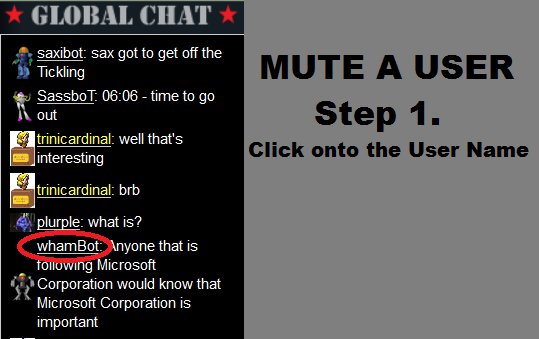
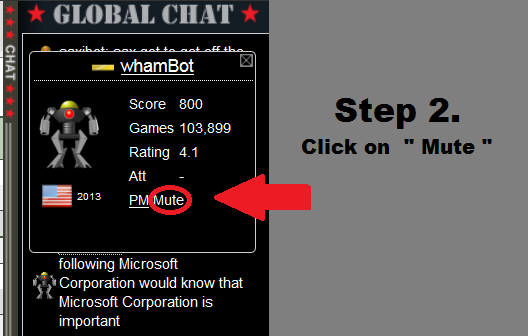
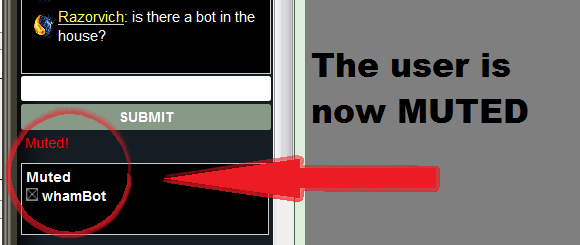
You will see their name appear in your muted box below and then you won’t see any more comments from them until you un-mute them or log off and back in. To un-mute them click on the little x next to their name in your Muted list.
The names of some chat moderators will show as yellow. These are the ones whose names are coloured purple on their walls. All other moderator names as well as regular usernames will show as white. Please follow any instructions etc from the chat moderators.
Remember that this is a basic chat so formatting of text in different styles and colours etc are not yet possible. Nor do links post as clickable links. These are options that may be implemented in the future but are not yet available. The only pictures that will currently show are a scaled down version of each user’s avatar (shown next to their name). Hopefully in time this will also change.
Sometimes while you have Global Chat open you might wish to hide it so you can see more of the page that you're on. To do so click on the Chat bar on the left side of the Global Chat and it will slide away. To open it back click on it again and it will reopen.
Unfortunately at this time it is not possible to get Global Chat while in the Forums and that is something that should be changed at a future date. I can’t say when exactly though since this will be up to
bigwham who is pretty busy with other aspects of the site.
FAQ’s
Q. Why doesn’t this chat have features for posting text in bold, italics or colours?
A. Please keep in mind that this is a simple chat program that
bigwham has written for the site to allow you greater communication in different areas of the site. As a result is not feature rich but will, in time, be improved so you can go ahead with your suggestions for improvement as well.
Q. Why are there no time-stamps for when messages are posted.
A. Again because this is a basic chat time-stamps are not yet included. This is expected to be included in a future update.
Q. Can I mute myself?
A. No you can’t…. do you really not want to see your own comments? We didn’t think so either
Q. Can I block/ban a user from Global Chat?
A. Only Chat moderators can block/ban a user but you can mute a user so you won’t see his/her comments (mute works for bots also)
Q. How long will my mute last?
A. The user will remain muted for you until you either un-mute them or you log off.
Q. My messages won’t post, I get “Message cannot be posted”. Did my chat break?
A. Your message may contain words that are not allowed to be posted in Global Chat because they may be Bigoted or otherwise offensive. Try posting a different message. If that still doesn’t work you’re either still being too profane/bigoted or you have been blocked/banned from Global Chat.
Q. I don’t see my posts but I’m not getting any error messages
A. Your chat may not have automatically scrolled with the messages. Try scrolling down.
Q. I’ve tried scrolling as you suggested but Its not scrolling further down and I still don’t see my messages. Why are they not posting?
A. Your messages may actually be posting but for some reason your chat hasn’t shown updated posts… try reloading the page or opening a new page.
Q. Why can’t I see global Chat from the Forums?
A. The Forums and some other pages are on a different template to the other site pages. Unfortunately this makes it difficult to integrate Global Chat into those pages at this time.
Q. A user has violated the guidelines but a moderator is not there or did not deal with it properly.
A. If you have a problem with a user’s posts or a moderator’s treatment of a situation please take screenshots of the violation/problem and send them to the Head Chatter (currently
trinicardinal) along with your explanation of the situation. It can then be investigated and appropriately dealt with.









 )
)