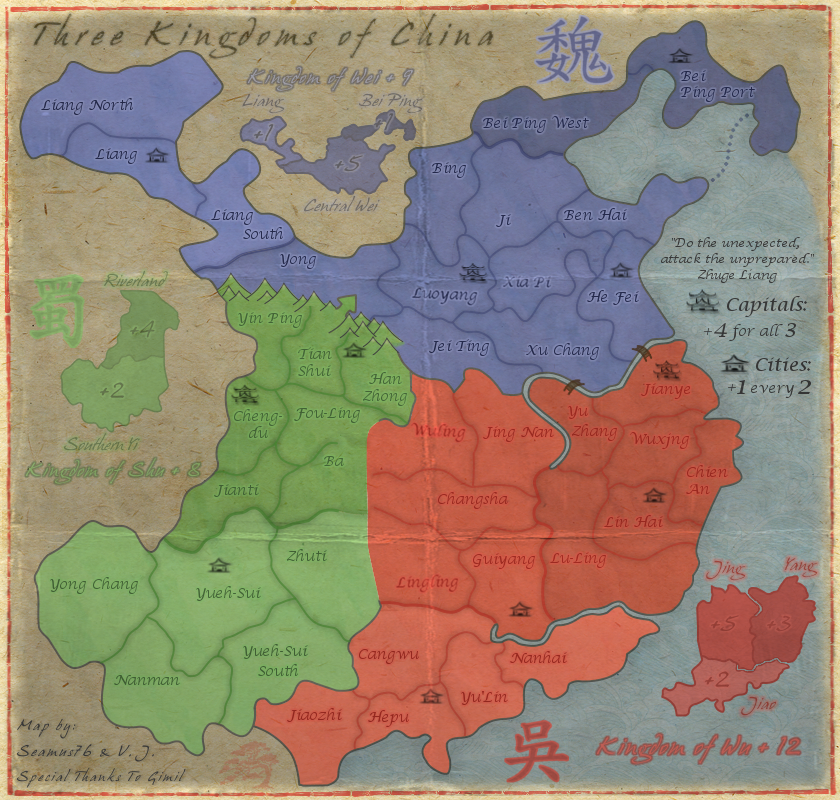
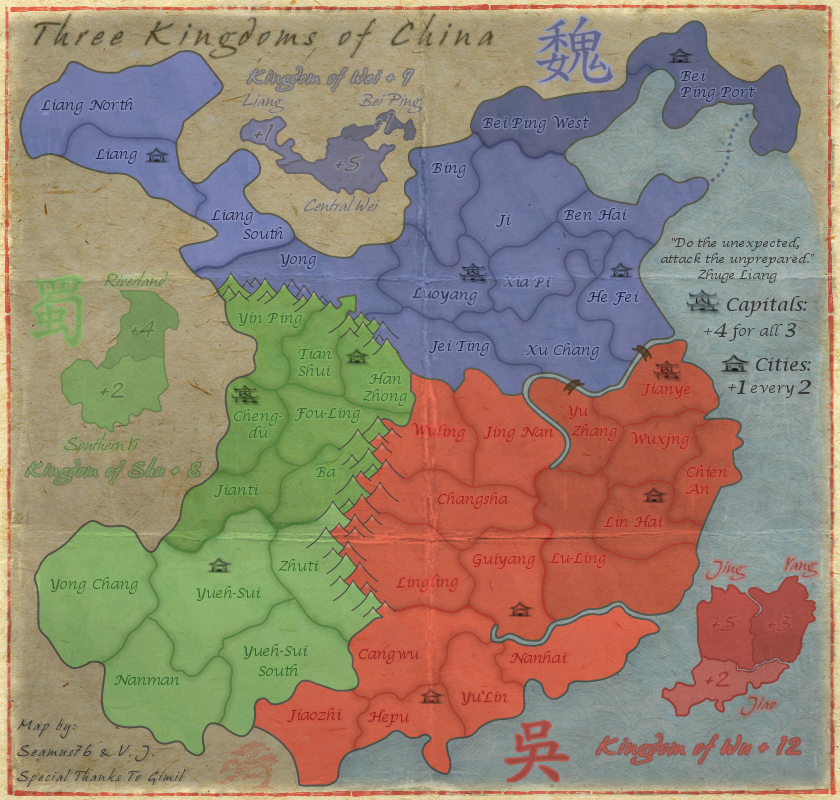
7. I'm sorry, but those mountains do not go with the rest of the map. They stick out like a sore thumb, so they need to be changed. RjBeals did a quick tutorial on hand drawn mountains, take a look at it and see what you can do.
Ouch, this one does sting a bit. Of course Rj makes it look extremely easy, but I'm willing to give it another go. The current mountains are the 4th version, and one of those thorns in my side. I thought we had come up with a winner, but I will give it my best shot and see what I can produce.
Thank you for your time and feedback. I really appreciate it.
It might be an idea to use the background (light brown texture) instead of the dark brown for the mountains. The background acts also as an impassable at the borders of the map so it could be a logical choice to make them blend in more.
Hi Seamus this look wonderful. Maybe after your next update I will pop back and give it a once over. I love how rugged yet simplistic the style you have used as turned out.
- Redid the Northern Shu mountains, and added a bit of "snow color" to the tops, but nothing else at the moment. Before I add more color to them, and more importantly before I do the Eastern mountains I want to get everyone's thoughts on these, especially isaiah40. I actually think they do look better and fit more with the style of the map, and if everyone agrees I'll go ahead and finish them up in this style.
Seamus76 wrote:- Redid the Northern Shu mountains, and added a bit of "snow color" to the tops, but nothing else at the moment. Before I add more color to them, and more importantly before I do the Eastern mountains I want to get everyone's thoughts on these, especially isaiah40. I actually think they do look better and fit more with the style of the map, and if everyone agrees I'll go ahead and finish them up in this style.
RjBeals wrote:those look nice. I wouldn't do much more with the shading or more color, sometimes less is more.
Thanks so much. I've been looking at them all day and you're right they don't need much if anything, maybe just a real light black brush, very low opacity.
Well Seamus, these mountains are 1000 times better, as you said fits more with the theme. I don't think you will need to any shading. As for the snow on the mountains, I can't really see it. I had to look really close to see, even then the snow was very hard to notice. I think you can do away with the snow.
So all that being said, you have my blessing, and go and sin no more my child!
Aye mountains look good. I can barely notice the "snow" so if you like that, you'll have to make it more noticeable. My -only- gripe with the mountains would be that at least a couple of them should be blue as well.
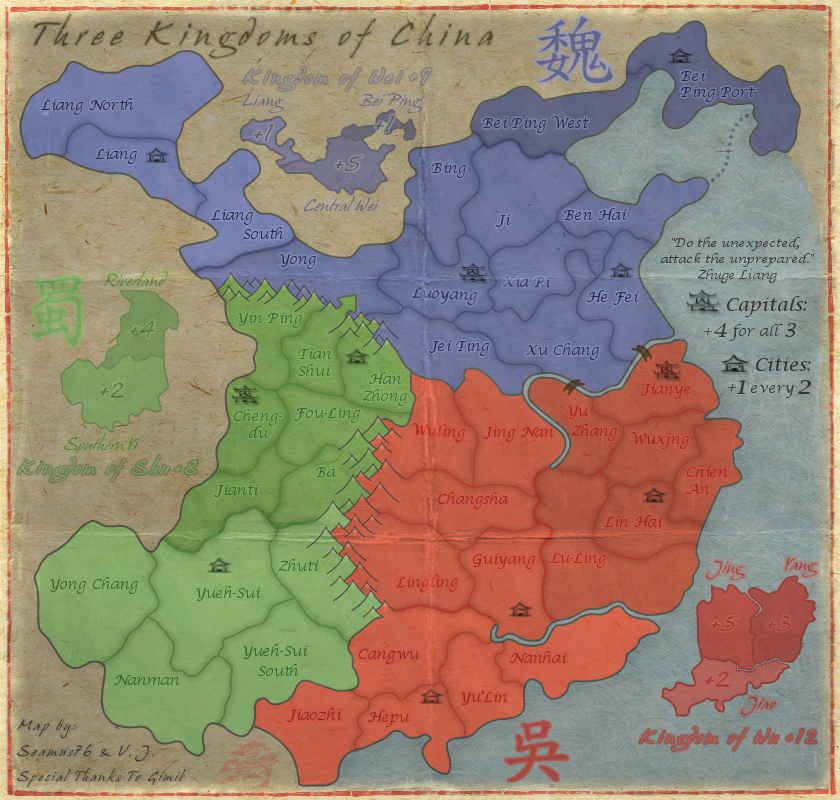
CURRENT UPDATE INFO - 2013-03-20:
- Added in the Eastern mountains.
- Redid the Northern mountains to include a few blue ones.
- Did a ton of general touch ups, border lines, stray pixels, etc. Still need to go over it again.
If this is acceptable I'll go ahead and start on the small map. Let me know your thoughts.
Seamus, the only problem I can see with the current draft is the borders between bonus zones. Green is good, blue is OK but red is really hard for me to see. Mainly between Jing and Yang. Might be an idea to run the darker lines you have between bonus groups in between the bonuses themselves.
isaiah40 wrote:1. The bonus amounts on the mini-map for Wu, especially on Yang is very hard to read. Maybe increase the outer glow a tad bit to make it stand out more. The same on Jing.
2. The bonus amount on Bei Ping is also hard to read, move it beside Bei Ping.
3. The Chinese character for Shu is hard to see as well, it needs to be darkened a bit.
4. Kingdom of Wu text is hard to tell exactly what it is. It looks like the "g" is an "s".
5. Kindom of Shu text is hard to read due to the light color you have. My suggestion is to use the same dark color you have for the bonus amounts.
6. I think that you will also need to adjust the kerning of the text for each "the Kingdom of ..." as the letters are very close together which also makes them hard to read. I can read them fine because I've been following the map, but first time players probably will have a hard time reading them.
isaiah40 wrote:1. The bonus amounts on the mini-map for Wu, especially on Yang is very hard to read. Maybe increase the outer glow a tad bit to make it stand out more. The same on Jing.
2. The bonus amount on Bei Ping is also hard to read, move it beside Bei Ping.
3. The Chinese character for Shu is hard to see as well, it needs to be darkened a bit.
4. Kingdom of Wu text is hard to tell exactly what it is. It looks like the "g" is an "s".
5. Kindom of Shu text is hard to read due to the light color you have. My suggestion is to use the same dark color you have for the bonus amounts.
6. I think that you will also need to adjust the kerning of the text for each "the Kingdom of ..." as the letters are very close together which also makes them hard to read. I can read them fine because I've been following the map, but first time players probably will have a hard time reading them.
Yes, sorry, working on these too. Just needed a quick break, the mountains took a lot out of me.
CURRENT UPDATE INFO - 2013-03-22:
- Made a lot changes, including all of the below from isaiah40, and Koontz, I also made those bonus lines darker, they should work for you.
isaiah40 wrote:1. The bonus amounts on the mini-map for Wu, especially on Yang is very hard to read. Maybe increase the outer glow a tad bit to make it stand out more. The same on Jing. Done
2. The bonus amount on Bei Ping is also hard to read, move it beside Bei Ping. I don't want to move it out, but I did bring out the outer glow more, which makes it easier to read.
3. The Chinese character for Shu is hard to see as well, it needs to be darkened a bit.Done
4. Kingdom of Wu text is hard to tell exactly what it is. It looks like the "g" is an "s".
5. Kindom of Shu text is hard to read due to the light color you have. My suggestion is to use the same dark color you have for the bonus amounts.
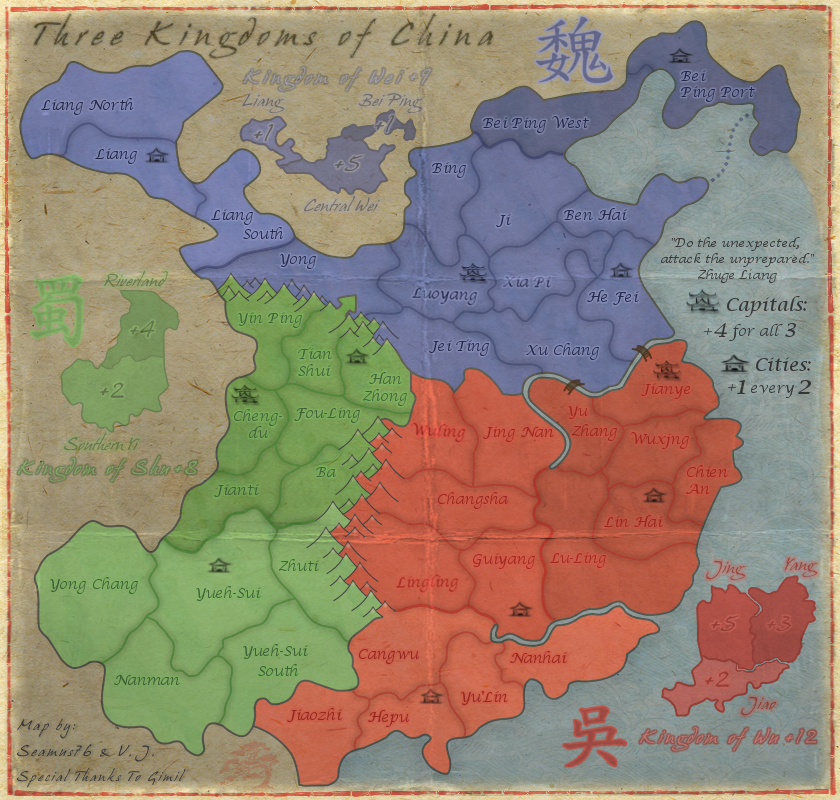
6. I think that you will also need to adjust the kerning of the text for each "the Kingdom of ..." as the letters are very close together which also makes them hard to read. I can read them fine because I've been following the map, but first time players probably will have a hard time reading them.Numbers 4-6 should be good as well. I brought them all out more, and increased the kerning on all of the "Kingdoms" test from 2-4, so double. Also, used a separate layer for the "+" values so I could bring them closer to the text, rather than being effected so much by the kerning.
Looking good seamus!! Just a couple more things. The text "Kingdom of Wu +12" and the associated character, I think they need a lighter outer glow like what you have around the text for the mini-map bonus regions. That's it for now.
isaiah40 wrote:Looking good seamus!! Just a couple more things. The text "Kingdom of Wu +12" and the associated character, I think they need a lighter outer glow like what you have around the text for the mini-map bonus regions. That's it for now.
The Characters are all solid colors, with a center color added by hand, so there is actually no outer glow on those. All of the colors are the same though, just reversed around. So the inside color of "Kingdom of Wu" is the same as the light border of the character, and the darker outer glow of the text is the same color as the inside of the character. The light border color of the character (inside Kingdom of Wu color), is the same as the outer glow of the smaller bonus region names. Not sure that all makes sense, but I'm basically playing off of the same colors for each area.
Yes it makes sense. In that case I suggest to make the "center" color lighter to match the other two kingdom texts. It just looks out of place, and not only that but harder to see and read.
CURRENT UPDATE INFO - 2013-03-24:
- Swapped out the inner color of the "Kingdom of Wu" mini-map header for the lighter glow color of the mini-map bonus names. This looks a more in line with the other headers. Thanks, isaiah40.
- Moved the Wu character closer to the header.
Not sure there is much else I can do with this one.
I think the Wu character would look better if the outside is a lighter color, which would also be in line with the other 2. While you get that done I'll go ahead and get this stickied for you!!
isaiah40 wrote:I think the Wu character would look better if the outside is a lighter color, which would also be in line with the other 2. While you get that done I'll go ahead and get this stickied for you!!
- Changed the Wu character outer edge color to the lighter color that's also inside the Kingdom of Wu header.
Thanks for the sticky. Working on small version now as well.