

Three Kingdoms of China - v10.1 [2015-02-01] p15 [Quenched]
Moderator: Cartographers
Forum rules
Please read the Community Guidelines before posting.
Please read the Community Guidelines before posting.
-
koontz1973
- Posts: 6960
- Joined: Thu Jan 01, 2009 10:57 am
Re: Three Kingdoms of China - v1.1 [2013-01-01] p1
Yep, only give one city out as a starting position. If you make each city a neutral, any not given out will start neutral, stopping all bonuses.

Re: Three Kingdoms of China - v1.1 [2013-01-01] p1
Ok, just to make sure I follow. So one of the 8 cities will be open to a player as a randomly given out tert. The other 7 will start 3 neutral. Is that correct? Then the next question, am I selecting which 1 of the 8 will be give out to a player, or does how does that work? I'm not sure how to show the starting neutrals, or how to list it in the first post. Thanks.koontz1973 wrote:Yep, only give one city out as a starting position. If you make each city a neutral, any not given out will start neutral, stopping all bonuses.
-
koontz1973
- Posts: 6960
- Joined: Thu Jan 01, 2009 10:57 am
Re: Three Kingdoms of China - v1.1 [2013-01-01] p1
8 cities, 2 player game.
Each player gets one city each, the other 6 start neutral.
8 cities, 5 player game.
Each player gets one, 3 start neutral.
What you programme into the xml is positions. This is a very easy part of the code to do. Here is the same exact code from my Madrid map. You just need to change the names. Then with the territories, just start them as a neutral. Any that are given out will start, those that are not, will start neutral. You cannot choose which one the players get, they will be handed out randomly. So player one will not get position one and player 4 may get position 6.
Each player gets one city each, the other 6 start neutral.
8 cities, 5 player game.
Each player gets one, 3 start neutral.
What you programme into the xml is positions. This is a very easy part of the code to do. Here is the same exact code from my Madrid map. You just need to change the names. Then with the territories, just start them as a neutral. Any that are given out will start, those that are not, will start neutral. You cannot choose which one the players get, they will be handed out randomly. So player one will not get position one and player 4 may get position 6.
madrid positions
<positions max="1">
<position>
<territory>Parque Agustín Rodríguez</territory>
</position>
<position>
<territory>Ventilla</territory>
</position>
<position>
<territory>Glorieta de Sandro Pertini</territory>
</position>
<position>
<territory>Plaza de Toros</territory>
</position>
<position>
<territory>Los Sacramentin</territory>
</position>
<position>
<territory>Atocha</territory>
</position>
<position>
<territory>Surbatan</territory>
</position>
<position>
<territory>Pozuelo de Alarcón</territory>
</position>
</positions>
<position>
<territory>Parque Agustín Rodríguez</territory>
</position>
<position>
<territory>Ventilla</territory>
</position>
<position>
<territory>Glorieta de Sandro Pertini</territory>
</position>
<position>
<territory>Plaza de Toros</territory>
</position>
<position>
<territory>Los Sacramentin</territory>
</position>
<position>
<territory>Atocha</territory>
</position>
<position>
<territory>Surbatan</territory>
</position>
<position>
<territory>Pozuelo de Alarcón</territory>
</position>
</positions>
Re: Three Kingdoms of China - v2.0 [2013-01-02] p2
CURRENT UPDATE INFO - 2013-01-02:
- Adjusted the size of the title to fit better.
- Brought out the Bonsai tree in the bottom left a little bit more.
- Redid all of the mountains by hand. (Insert patting self on back here )
)
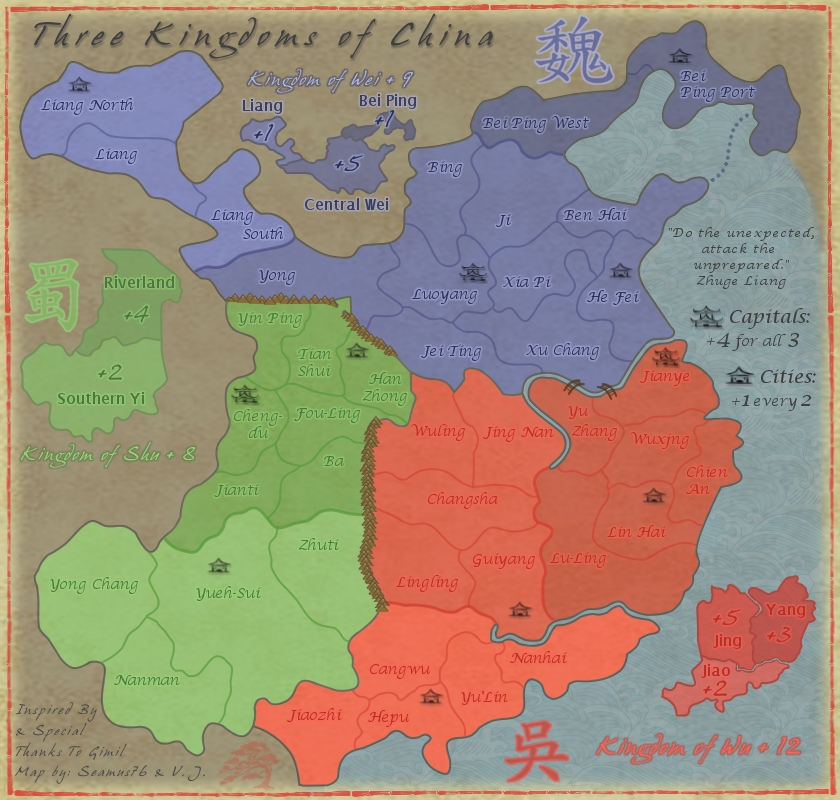
The main thing is that I added 8 cities to be part of the new City Bonus of +1 for every 2. Each player will start with 1 city. I also plan to move the City from Liang North to Liang, so that it has two borders.
CURRENT MAP VERSION:
v2.0 - Large (840x800)
- Adjusted the size of the title to fit better.
- Brought out the Bonsai tree in the bottom left a little bit more.
- Redid all of the mountains by hand. (Insert patting self on back here
)The main thing is that I added 8 cities to be part of the new City Bonus of +1 for every 2. Each player will start with 1 city. I also plan to move the City from Liang North to Liang, so that it has two borders.
CURRENT MAP VERSION:
v2.0 - Large (840x800)
- Click image to enlarge.
-
koontz1973
- Posts: 6960
- Joined: Thu Jan 01, 2009 10:57 am
Re: Three Kingdoms of China - v2.0 [2013-01-02] p2
Seamus, Last thing from me before I pass you over to the game play boys, that bonsai tree, make it look like a tree. Brown trunk, green leaves.
Mountains do fit better. Cities look good, that one you mentioned, yes to the move. Well placed as well.
Mountains do fit better. Cities look good, that one you mentioned, yes to the move. Well placed as well.
Re: Three Kingdoms of China - v2.1 [2013-01-03] p2
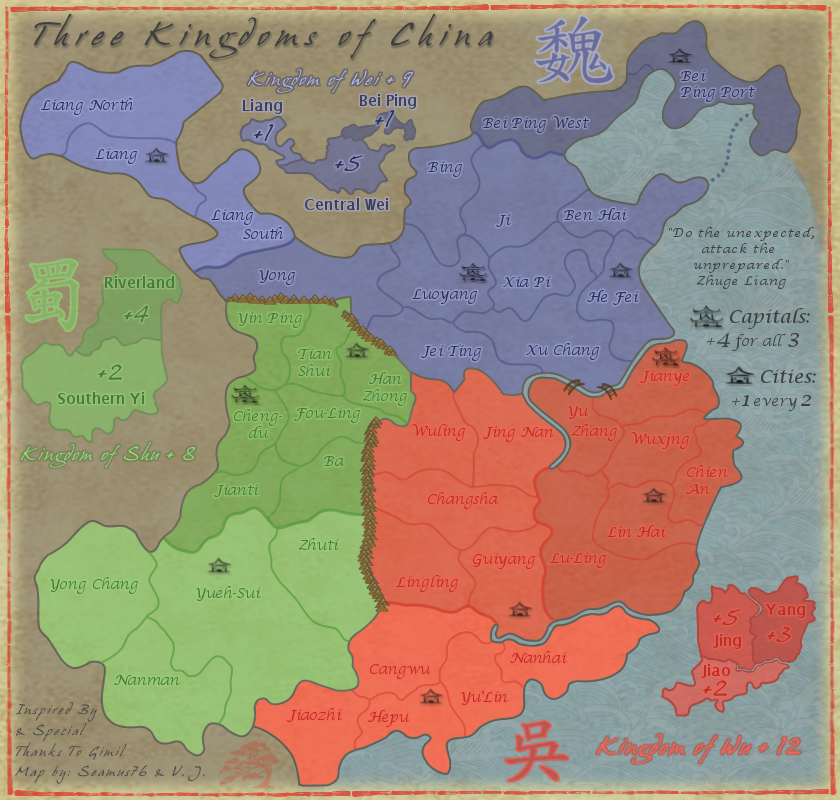
CURRENT UPDATE INFO - 2013-01-03:
- Moved the City icon from Liang North to Liang.
What else? Let's keep this one moving.

CURRENT MAP VERSION:
v2.1 - Large (840x800)
- Moved the City icon from Liang North to Liang.
What else? Let's keep this one moving.
As for the bonsai tree, it's supposed to be a faded red silhouette, red being the Chinese color for good luck. I also did try using an actual looking tree, but it didn't look right with the rest of the look and feel of the map. Surely this shouldn't hold up the progress of the map, right.Postby koontz1973 on Thu Jan 03, 2013 1:30 am
Seamus, Last thing from me before I pass you over to the game play boys, that bonsai tree, make it look like a tree. Brown trunk, green leaves.
CURRENT MAP VERSION:
v2.1 - Large (840x800)
- Click image to enlarge.
Re: Three Kingdoms of China - v2.1 [2013-01-03] p3
To quote my favorite band of all time, Pink Floyd...Is there anybody out there?
-
generalhead
- Posts: 806
- Joined: Mon Apr 26, 2010 10:09 pm
Re: Three Kingdoms of China - v2.1 [2013-01-03] p3
How is the color blindness going to work with the colors being so close?
Can you just have inspired by Gimil, do you have to have inspired by and special thanks?
Can you try a black outline with a lowered opacity on the bonus names because they are pretty hard to read. ex. Kingdom of Shu
The mountain pass at tian shui might need opened up a little bit.
For the capitals do you think an auto deploy would be better?
Awesome map buddy.
Can you just have inspired by Gimil, do you have to have inspired by and special thanks?
Can you try a black outline with a lowered opacity on the bonus names because they are pretty hard to read. ex. Kingdom of Shu
The mountain pass at tian shui might need opened up a little bit.
For the capitals do you think an auto deploy would be better?
Awesome map buddy.
Last edited by generalhead on Thu Jan 03, 2013 10:09 pm, edited 1 time in total.

Re: Three Kingdoms of China - v2.1 [2013-01-03] p3
I think the original mountians were better. These are cheap.
Everything looks very washed out to me. A little contrast may help the "pop" of the map.
I've never liked the broad curved borders - they look rushed, like it took about 2 minutes to draw some curves and stroke them. You may like them, it's personal preference, I just think a map looks better with some more jagged areas.
good colors overall - maybe add a bit more texture / grunge to the background
(edit) I understand this is in draft room still - I prefer to comment on gfx rather than gameplay.
Everything looks very washed out to me. A little contrast may help the "pop" of the map.
I've never liked the broad curved borders - they look rushed, like it took about 2 minutes to draw some curves and stroke them. You may like them, it's personal preference, I just think a map looks better with some more jagged areas.
good colors overall - maybe add a bit more texture / grunge to the background
(edit) I understand this is in draft room still - I prefer to comment on gfx rather than gameplay.

Re: Three Kingdoms of China - v2.1 [2013-01-03] p3
Sorry for this long ass quote/reply.

I'd like to hear more from some CB players to find out how they are seeing it. To me they are different shades, plus there are mini-maps which show the differences more clearly. At the moment the colors are what they are.generalhead wrote:How is the color blindness going to work with the colors being so close?
I suppose. There was some space I needed to use up, and I wanted to make sure to give him some extra props.generalhead wrote:Can you just have inspired by Gimil, do you have to have inspired by and special thanks?
Do you mean the names on the mini-maps?generalhead wrote:Can you try a black outline with a lowered opacity on the bonus names because they are pretty hard to read.
You think it's too small or something? I'm not sure players will have a problem quickly recognizing it's a one way.generalhead wrote:The mountain pass at tian shui might need opened up a little bit.
With the added City bonus I think that might be a good idea to have them a little different. Anyone else have a thought on that, and if it should be a straight +1 or maybe a +2 auto-deploy?generalhead wrote:For the capitals do you think an auto deploy would be better?
Thanks very much, now get back to working on your map gh!generalhead wrote:Awesome map buddy.
I'm not sure how many other people liked the first mountains, but I do think these fit a little better with the look and feel. I'm really not that good with graphics and they were my first attempt at hand drawn mountains, or should I say stroked with hand drawn paths and then colored by hand. The first were part of a brush pack I edited and colored. What do you think I can do with the current ones to help make them look a little better? Or how would one make hand drawn mountains better?RjBeals wrote:Thu Jan 03, 2013 11:09 pm
I think the original mountians were better. These are cheap.
I actually toned down the opacity quite a bit to give it that old washed out faded look. If you were to add some pop to it, what would your thoughts be?RjBeals wrote:Everything looks very washed out to me. A little contrast may help the "pop" of the map.
Yeah, I like that look and feel too, not sure I'll go back on this one and redo the lines though. They may look rushed, but from your experience you know they are not, there are over 200 path points that had to be adjusted for the entire Kingdom of Wei border alone to get them to be so smooth.RjBeals wrote:I've never liked the broad curved borders - they look rushed, like it took about 2 minutes to draw some curves and stroke them. You may like them, it's personal preference, I just think a map looks better with some more jagged areas.
Thanks. Your maps are certainly great examples of awesome backgrounds and map texture. Any pro-tips?RjBeals wrote:good colors overall - maybe add a bit more texture / grunge to the background
Rj, thank you so much for taking the time to comment. Whether it's gfx or gameplay your opinion is extremely valuable, and I appreciate it.RjBeals wrote:(edit) I understand this is in draft room still - I prefer to comment on gfx rather than gameplay.
Re: Three Kingdoms of China - v2.1 [2013-01-03] p3
Here's a quick comparison. Bolder colors. I just threw this together, maybe it will help.

Re: Three Kingdoms of China - v2.1 [2013-01-03] p3
Just threw it together huh?RjBeals wrote:Here's a quick comparison. Bolder colors. I just threw this together, maybe it will help.
I wish I could throw it together like that. But seriously, very nice, especially the background and tert border texture, and the mountains. Are those part of a brush pack? How did you do their shading and coloring? I know you are asking for "bolder colors", but I'd love to know your techniques and apply them to my colors to see how it looks. The other reason I'm hesitant to change is the Red I'm using is Vermillion, which is the traditional red pigment for Chinese art. Every other red on the map is built off of this one color so I would like to exhaust some other options first.-
koontz1973
- Posts: 6960
- Joined: Thu Jan 01, 2009 10:57 am
Re: Three Kingdoms of China - v2.1 [2013-01-03] p3
RJBeals does not use brush packs. Now if you can copy what RJ did for the rest of the map, it would look stunning. A little dark for the complete map but that would be an easy thing.
Re: Three Kingdoms of China - v2.1 [2013-01-03] p3
I'll send you the psd (assuming you are using photoshop) when I log into the laptop later. Drew a mountain with 1px round black brush. Then duplicated the layer few times and created the range. Then erased the parts of the mountains in the background. Then colored in with tan. I used a 10% opacity black brush to trace over the borders to give the shadow look. Nothing neat just a few strokes, and some overlapping to give a deeper shadow. I did use a subtle pattern to overlay the entire piece for texture. I used a very very subtle 1px dropshadow set to 90 degrees, no blur, and changed color to white to give the borders a little extra pop.
Re: Three Kingdoms of China - v2.1 [2013-01-03] p3
Certainly send along, that would be great. I'll give it a try myself as well.RjBeals wrote:I'll send you the psd (assuming you are using photoshop) when I log into the laptop later. Drew a mountain with 1px round black brush. Then duplicated the layer few times and created the range. Then erased the parts of the mountains in the background. Then colored in with tan. I used a 10% opacity black brush to trace over the borders to give the shadow look. Nothing neat just a few strokes, and some overlapping to give a deeper shadow. I did use a subtle pattern to overlay the entire piece for texture. I used a very very subtle 1px dropshadow set to 90 degrees, no blur, and changed color to white to give the borders a little extra pop.
It looks like you also traced all of the borders themselves with black, correct?I used a 10% opacity black brush to trace over the borders to give the shadow look. Nothing neat just a few strokes, and some overlapping to give a deeper shadow.
What did you use the dropshadow on? The bottom black tert name? And you say you did white? I see the tert name in white which does pop nicely.I used a very very subtle 1px dropshadow set to 90 degrees, no blur, and changed color to white to give the borders a little extra pop.
Sorry to be a pain. Teach a man to fish...right.
Re: Three Kingdoms of China - v2.1 [2013-01-03] p3
It seems most of what needs to be done on the map is graphics related, can we get a Draft Stamp, and possible Gameplay Stamp?
Re: Three Kingdoms of China - v2.1 [2013-01-03] p3
I also didn't mean to step in and suggest re-doing this map. The best way I can give feedback is through a sample. You've got a solid start, and I was just offering some tips on ways to improve graphics. If the colors you're after a based on some traditional Chinese colors or samples - then that's great.
Re: Three Kingdoms of China - v2.1 [2013-01-03] p3
Oh please Rj, don't think that at all, and know I really appreciate your time and help. This would be like turning down music lessons from the Beatles, I just hope to bring the map up to a level that I know other more talented artists can do, which might be hard.RjBeals wrote:I also didn't mean to step in and suggest re-doing this map. The best way I can give feedback is through a sample. You've got a solid start, and I was just offering some tips on ways to improve graphics. If the colors you're after a based on some traditional Chinese colors or samples - then that's great.
As for the mountains, I'm trying the hand drawn route, but they look extremely cartoonish. More so than the current version posted. I'm going to keep working on them, and will come up with something, but in the mean time I think all of the gameplay issues are worked out, no?
Re: Three Kingdoms of China - v2.2 [2013-01-08] p3
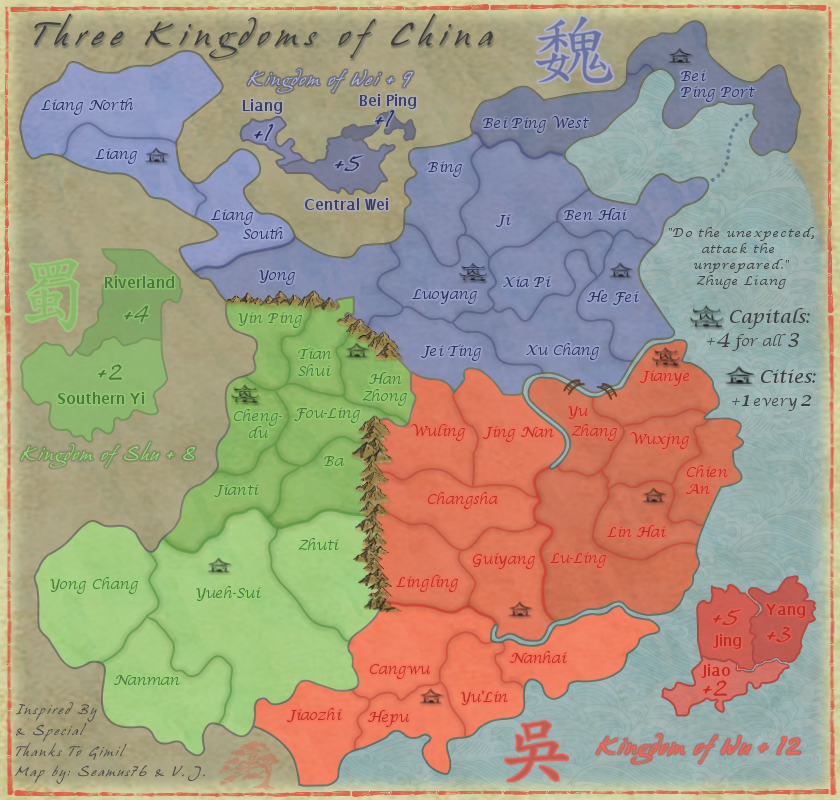
CURRENT UPDATE INFO - 2013-01-08:
- Updated the mountains. Not sure I can do much better than these. If these are acceptable I'll work on the coloring at the base of the mountains to blend them in a bit better.
- Lightened the map a bit.
- Added a little more texture to the entire map.
- Added a dark shadow around the tert lines.
What else? Let's get some stamps on this bad boy.
CURRENT MAP VERSION:
v2.2 - Large (840x800)
- Updated the mountains. Not sure I can do much better than these. If these are acceptable I'll work on the coloring at the base of the mountains to blend them in a bit better.
- Lightened the map a bit.
- Added a little more texture to the entire map.
- Added a dark shadow around the tert lines.
What else? Let's get some stamps on this bad boy.
CURRENT MAP VERSION:
v2.2 - Large (840x800)
- Click image to enlarge.

Re: Three Kingdoms of China - v2.2 [2013-01-08] p3
Seamus, from Tian Shui to Yong through those mountains...is that a one-way arrow? If so, it needs to be better defined? If not the border squareness needs changing os it doesn't look like a one-way arrow. 
On the mountains...maybe a little shadow base left side...nice work btw...nothing wrong with those imo...but then i don't exactly do the best mountains all the time.
the bridges...are they meant to be floorless?
On the mountains...maybe a little shadow base left side...nice work btw...nothing wrong with those imo...but then i don't exactly do the best mountains all the time.
the bridges...are they meant to be floorless?
* Pearl Harbour * Waterloo * Forbidden City * Jamaica * Pot Mosbi
Re: Three Kingdoms of China - v2.2 [2013-01-08] p3
Jiao-Jing can it have a bit more contrast, bonus structure seems good.
Also this might come after when game play will be discussed, but seems to me that bottom cities are closer together then upper.
Also this might come after when game play will be discussed, but seems to me that bottom cities are closer together then upper.
Re: Three Kingdoms of China - v2.2 [2013-01-08] p3
Thanks for the feedback.cairnswk wrote:Seamus, from Tian Shui to Yong through those mountains...is that a one-way arrow? If so, it needs to be better defined? If not the border squareness needs changing os it doesn't look like a one-way arrow.
On the mountains...maybe a little shadow base left side...nice work btw...nothing wrong with those imo...but then i don't exactly do the best mountains all the time.
the bridges...are they meant to be floorless?
Yeah, it's a one-way arrow, I was looking at it after posting the update and realized it needs some work as well. Thanks on the mountains. I'll add the shadow, good idea. And I was looking at the bridges as well. There meant to be kind of walking bridges, but I'll fill in some of the empty spots with other boards to make it look more structurally sound, etc.
I can try tweaking it a little, but I have pretty much tried to keep them all as it, which does have enough contrast to tell them apart, etc. Thanks for the feedback benga.by benga on Tue Jan 08, 2013 2:56 pm
Jiao-Jing can it have a bit more contrast, bonus structure seems good.
Also this might come after when game play will be discussed, but seems to me that bottom cities are closer together then upper.
Re: Three Kingdoms of China - v2.2 [2013-01-08] p3
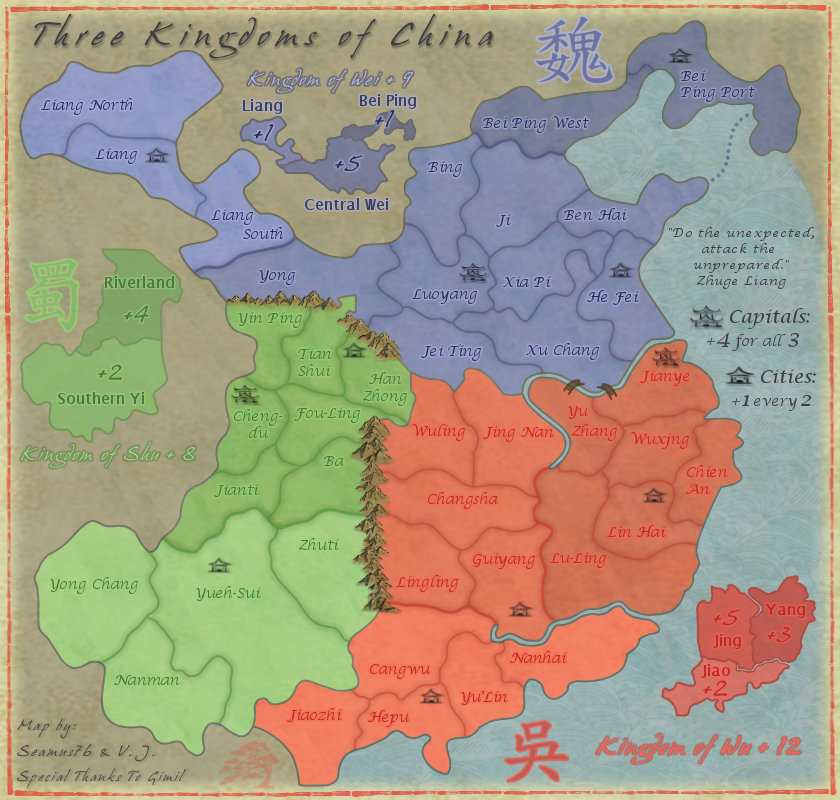
CURRENT UPDATE INFO - 2013-01-09:
- Added some more color to the bridges to fill them in, but they are meant to be oriental style walking bridges, so I didn't want to completely fill them in.
- Re-did the one-way arrow from Tian Shui to Yong. Should be pretty clear now, but if not let me know.
- Need to add a little shadow to the mountains, as per cairns' suggestion.
Let's get some stamps on this bad boy.
CURRENT MAP VERSION:
v2.3 - Large (840x800)
- Added some more color to the bridges to fill them in, but they are meant to be oriental style walking bridges, so I didn't want to completely fill them in.
- Re-did the one-way arrow from Tian Shui to Yong. Should be pretty clear now, but if not let me know.
- Need to add a little shadow to the mountains, as per cairns' suggestion.
Let's get some stamps on this bad boy.
CURRENT MAP VERSION:
v2.3 - Large (840x800)
- Click image to enlarge.
-
generalhead
- Posts: 806
- Joined: Mon Apr 26, 2010 10:09 pm
Re: Three Kingdoms of China - v2.3 [2013-01-09] p4
Mountains look good.
I agree with benga about the Jiao and jing contrats. It is a little too close. did you try the contrast, brightness color option?
That is all I see for now, great map.
I agree with benga about the Jiao and jing contrats. It is a little too close. did you try the contrast, brightness color option?
That is all I see for now, great map.
Re: Three Kingdoms of China - v2.3 [2013-01-09] p4
Ok, I think I see what you're talking about and will make Jiao a little lighter.generalhead wrote:Mountains look good.
I agree with benga about the Jiao and jing contrats. It is a little too close. did you try the contrast, brightness color option?
That is all I see for now, great map.
You would say the mini-map has good contrast though, correct? I believe it does.