Improved Army Printing

Archival storage for Announcements. Peruse old Announcements here!

Moderator: Community Team

Forum rules
Please read the Community Guidelines before posting.
Locked
User avatar
lackattack
Posts: 6097
Joined: Sun Jan 01, 2006 10:34 pm
Location: Montreal, QC

Re: Improved Army Printing

Post by lackattack »

UPDATE: I posted new script upgrade links. They should all work :)

sherkaner wrote:About the font changes: it's now decided in the CSS which font is used. This should normally be about equal to what it was, but there could be browser differences etc. that didn't show before (since it was an image before). If you think the font looks very strange, please provide a snapshot.


Good point - some Mac or Linux users could be missing compatible fonts. There are fallback fonts for Mac and Linux, but they are not necessarily 100% the same. If you don't like what you see, try to install fonts in this order of preference: Tahoma, Geneva, Verdana, sans-serif. A snapshot plus OS version would help us help you.
rufus3000
Posts: 16
Joined: Tue Apr 29, 2008 9:08 pm

Re: Improved Army Printing

Post by rufus3000 »

Any chance you can make it a little easier to read?

I use regular old Explorer to play, with color codes on, and the result looks really blurry.
User avatar
natty dread
Posts: 12877
Joined: Fri Feb 08, 2008 8:58 pm
Location: just plain fucked

Re: Improved Army Printing

Post by natty dread »

I like this update. Any chance you could fix the 3-digit number centering too?
Image
User avatar
jricart
Posts: 2931
Joined: Fri Jan 09, 2009 6:52 pm
Gender: Male

Re: Improved Army Printing

Post by jricart »

Since you guys are improving this site a lot recently, how possible it is to include BOB and Clickies in the main site programming so we dont need to use add-ons?

Most of the people use them, and that will eliminate a lot of issues when you guys do upgrades, dont you think?
User avatar
cachejob
Posts: 133
Joined: Fri Jun 26, 2009 6:28 pm
Gender: Male
Location: Canada

Re: Improved Army Printing

Post by cachejob »

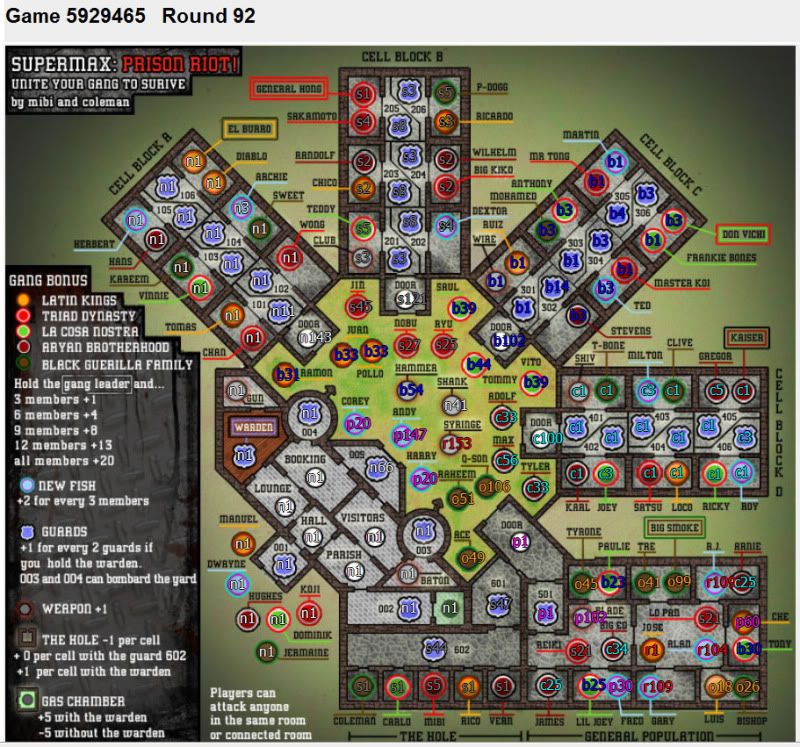
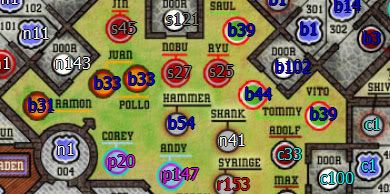
a lot of the black borders on the #s aren't lining up, making for blurry, double vision in areas. not sure if this will need to be dealt with on a map by map basis or not. here's an example, notice the door on C block and Ramon in the yard:

Image


Image
User avatar
Caymanmew
Clan Director
Clan Director
Posts: 3234
Joined: Tue Feb 10, 2009 7:54 am
Gender: Male
Location: Ottawa

Re: Improved Army Printing

Post by Caymanmew »

fix the clickes lack!
Image
sherkaner
Posts: 1595
Joined: Thu May 03, 2007 3:21 am
Gender: Male
Location: Zwolle

Re: Improved Army Printing

Post by sherkaner »

caymanmew wrote:fix the clickes lack!

Lack isn't in charge of the clickies, I am.. I forgot to remove something, 4.1 should work.
User avatar
lackattack
Posts: 6097
Joined: Sun Jan 01, 2006 10:34 pm
Location: Montreal, QC

Re: Improved Army Printing

Post by lackattack »

cachejob wrote:a lot of the black borders on the #s aren't lining up, making for blurry, double vision in areas. not sure if this will need to be dealt with on a map by map basis or not. here's an example, notice the door on C block and Ramon in the yard


How strange! What browser and OS do you have? Were you using any community scripts?
sherkaner
Posts: 1595
Joined: Thu May 03, 2007 3:21 am
Gender: Male
Location: Zwolle

Re: Improved Army Printing

Post by sherkaner »

cachejob wrote:a lot of the black borders on the #s aren't lining up, making for blurry, double vision in areas. not sure if this will need to be dealt with on a map by map basis or not. here's an example, notice the door on C block and Ramon in the yard:

Interesting. I suspect you're playing in IE with the screen 1 time enlarged (ctrl-+, ctrl-0 should get it back to normal). Won't be an easy fix, I suggest going back to normal size (pressing ctrl-0 once) for now.
User avatar
cachejob
Posts: 133
Joined: Fri Jun 26, 2009 6:28 pm
Gender: Male
Location: Canada

Re: Improved Army Printing

Post by cachejob »

good call guys. it's firefox on win7, but it was the larger font size that was throwing it off. ctrl-0 reset it and it looks fine now, though everything is a little on the small size now lol. thanks and keep up the good work! =D>
User avatar
Gold Knight
Posts: 2749
Joined: Tue Apr 17, 2007 9:47 am
Gender: Male
Location: Out here in these woods...

Re: Improved Army Printing

Post by Gold Knight »

It seems like a lot of my armies are casting a shadow, or possibly not filling in the entire character with color... Not sure, but its really difficult to read for me, and its not occurring with all the numbers, just some...
Image
xxtig12683xx wrote:yea, my fav part was being in the sewer riding a surfboard and wacking these alien creatures.

shit was badass
User avatar
Caymanmew
Clan Director
Clan Director
Posts: 3234
Joined: Tue Feb 10, 2009 7:54 am
Gender: Male
Location: Ottawa

Re: Improved Army Printing

Post by Caymanmew »

sherkaner wrote:
caymanmew wrote:fix the clickes lack!

Lack isn't in charge of the clickies, I am.. I forgot to remove something, 4.1 should work.


ok thanks working good now :mrgreen:
Image
User avatar
Industrial Helix
Posts: 3462
Joined: Mon Jul 14, 2008 6:49 pm
Gender: Female
Location: Ohio

Re: Improved Army Printing

Post by Industrial Helix »

I wish the colors could be a little more desaturated... they're kind of blinding.
Sketchblog [Update 07/25/11]: http://indyhelixsketch.blogspot.com/
Living in Japan [Update 07/17/11]: http://mirrorcountryih.blogspot.com/
Russian Revolution map for ConquerClub [07/20/11]: viewtopic.php?f=241&t=116575
User avatar
FireStar
Posts: 322
Joined: Tue Jan 09, 2007 5:34 pm
Gender: Female

Re: Improved Army Printing

Post by FireStar »

sherkaner wrote:
cachejob wrote:a lot of the black borders on the #s aren't lining up, making for blurry, double vision in areas. not sure if this will need to be dealt with on a map by map basis or not. here's an example, notice the door on C block and Ramon in the yard:

Interesting. I suspect you're playing in IE with the screen 1 time enlarged (ctrl-+, ctrl-0 should get it back to normal). Won't be an easy fix, I suggest going back to normal size (pressing ctrl-0 once) for now.


You are Right. I use FireFox... I have BOB and clickies, but unless I use the normal zoom, or am zoomed in more, It becomes blury like mentioned above... I can live with having it at the normal zoom. I am sure I as well as many others though do not prefer having the zoom at normal.
Image
User avatar
FireStar
Posts: 322
Joined: Tue Jan 09, 2007 5:34 pm
Gender: Female

Re: Improved Army Printing

Post by FireStar »

Image
Here is a screenshot...
as you can see the five gets chopped up and the black lines disappear from the bottom of the red one and top of orange three...
It's hard to read this way
Image
User avatar
FireStar
Posts: 322
Joined: Tue Jan 09, 2007 5:34 pm
Gender: Female

Re: Improved Army Printing

Post by FireStar »

Hate to triple post, but my clickies aren't working (Yes, I'm using the latest version)

All the territories on the edge are off while I had to refresh the page to simply manually end each phase. (shortcuts keys didn't work)
Image
User avatar
AndyDufresne
Posts: 24935
Joined: Fri Mar 03, 2006 8:22 pm
Location: A Banana Palm in Zihuatanejo
Contact:

Re: Improved Army Printing

Post by AndyDufresne »

jricart wrote:Since you guys are improving this site a lot recently, how possible it is to include BOB and Clickies in the main site programming so we dont need to use add-ons?

Most of the people use them, and that will eliminate a lot of issues when you guys do upgrades, dont you think?


We are already working to add various Tools & Enhancements as site features. :) Stay tuned for this.


--Andy
User avatar
skillfusniper33
Posts: 835
Joined: Thu Jul 19, 2007 12:48 pm
Gender: Male
Location: Washington

Re: Improved Army Printing

Post by skillfusniper33 »

Gold Knight wrote:It seems like a lot of my armies are casting a shadow, or possibly not filling in the entire character with color... Not sure, but its really difficult to read for me, and its not occurring with all the numbers, just some...


I have the same thing, it seems to be mainly with blue, and with numbers that tend to be close together 4, 6, 8, and i think it has to deal with the black outlining of the numbers.
Image
Place: 267 Score: 2630
User avatar
Tobikera
Posts: 368
Joined: Tue Aug 07, 2007 9:53 am
Gender: Male
Location: Western Panamanian Highlands

Re: Improved Army Printing

Post by Tobikera »

I wouldn't call this "improved army printing." Since updating Bob, as requested by the flashing red notice on the Bob Menu, my letters are larger, seemingly a different font, and blurry. Also, for some reason, my Australia map doesn't ever load - stuck in eternal Bob processing. I use FireFox 3.6.3. Any clues would be appreciated. I'm not going to play the Ctrl+ and Ctrl- game every time I log in - that's ridiculous. I appreciate the efforts to improve CC, but this one sent me back a couple steps. :?

Tobikera
Image
User avatar
lokisgal
SoC Training Adviser
Posts: 1518
Joined: Sat Mar 17, 2007 8:11 pm
Location: Clowns to the left of me Jokers to the right...

Re: Improved Army Printing

Post by lokisgal »

I upgraded bob- lost it totally though it shows in my tools that its still there. Dumped it re installed it still nothing. Im running a mac OS 10.4.1 and yes I have all the correct fonts
Bob has disappeared from my side menu I can see
Game menu
Interaction Menu
Personal Menu
Map Rank GL
I have no stats no nada - this sucks.
I just tried to de and re install again and still its not working at all.


I upgraded because it wasnt working with out the upgrade either. GRRRRRRRRRR :twisted:
Last edited by lokisgal on Mon Jun 14, 2010 8:45 pm, edited 1 time in total.
Image
User avatar
iamkoolerthanu
Posts: 4119
Joined: Sun Dec 31, 2006 6:56 pm
Gender: Male
Location: looking at my highest score: 2715, #170

Re: Improved Army Printing

Post by iamkoolerthanu »

I like the new font.. It will take some getting used to, but I still like it ;)

The only thing I am having trouble with is Clickable Maps.. The new version in this thread, and in the actual thread, isn't working for me.. I will sort it out though :)
User avatar
the.killing.44
Posts: 4724
Joined: Thu Oct 23, 2008 7:43 pm
Gender: Male
Location: now tell me what got two gums and knows how to spit rhymes
Contact:

Re: Improved Army Printing

Post by the.killing.44 »

This font is disgustingly bold and blurry, and the stroke is even worse.

Go back to the pixel one.
User avatar
lokisgal
SoC Training Adviser
Posts: 1518
Joined: Sat Mar 17, 2007 8:11 pm
Location: Clowns to the left of me Jokers to the right...

Re: Improved Army Printing

Post by lokisgal »

AND IT DOESNT WORK ON A MAC - I HAVE ALL THE FONTS AND NOW I HAVE NO BOB!!!!
Image
User avatar
lokisgal
SoC Training Adviser
Posts: 1518
Joined: Sat Mar 17, 2007 8:11 pm
Location: Clowns to the left of me Jokers to the right...

Re: Improved Army Printing

Post by lokisgal »

lokisgal wrote:AND IT DOESNT WORK ON A MAC - I HAVE ALL THE FONTS AND NOW I HAVE NO BOB!!!!


Im in foggy games and its important for kills and so on i cant tell how many someone has left - wtf
when is this going to be fixed???!!

I updated on one comp OS 10.4.1 (mac) now bob is just gone
did not update on another - same system and I cant load maps.....
Image
User avatar
king achilles
Support Admin
Support Admin
Posts: 13400
Joined: Wed Jun 13, 2007 10:55 pm
Gender: Male
Contact:

Re: Improved Army Printing

Post by king achilles »

FireStar wrote:Hate to triple post, but my clickies aren't working (Yes, I'm using the latest version)

All the territories on the edge are off while I had to refresh the page to simply manually end each phase. (shortcuts keys didn't work)


I suggest that you continue this with the CM thread here.

====================

skillfusniper33 wrote:I have the same thing, it seems to be mainly with blue, and with numbers that tend to be close together 4, 6, 8, and i think it has to deal with the black outlining of the numbers.

Tobikera wrote:I wouldn't call this "improved army printing." Since updating Bob, as requested by the flashing red notice on the Bob Menu, my letters are larger, seemingly a different font, and blurry. Also, for some reason, my Australia map doesn't ever load - stuck in eternal Bob processing. I use FireFox 3.6.3. Any clues would be appreciated. I'm not going to play the Ctrl+ and Ctrl- game every time I log in - that's ridiculous. I appreciate the efforts to improve CC, but this one sent me back a couple steps. :?

Please be sure that you are viewing the map on a 'normal' level and not in a zoomed setting. For now, I would say this is the "fix" in avoiding to see any sort of blurry numbers or letters.

======================

lokisgal
Let's try this. Clear your cache and cookies. Uninstall BOB if it's there. Then check if you have the latest version of your browser. Restart pc. Install BOB again.

Image
Please don't have more than 1 account. If you have any CC concerns, you can contact us here.
Locked

Return to “Announcement Archives”