Page 7 of 9
Re: guatemala(v10)
Posted: Thu Sep 09, 2010 10:03 pm
by natty dread
I merged the layers

Should not have done that.. always keep everything on separate layers.
Re: guatemala(v10)
Posted: Fri Sep 10, 2010 5:38 am
by Victor Sullivan
You think you could move the "impassables:" part of your legend to a different spot in the legend (or outside the legend, I suppose)? It's rather awkwardly squeezed in there.
Re: guatemala(v10)
Posted: Fri Sep 10, 2010 9:20 am
by jleonnn
natty_dread wrote:I merged the layers
Should not have done that.. always keep everything on separate layers.
I thought u said to have everything on one layer?
and I'll get that done, vic
Re: guatemala(v10)
Posted: Fri Sep 10, 2010 10:19 am
by natty dread
I've never said that...

Always keep EVERYTHING on it's own layer, so that if you need to edit something it doesn't affect the other layers.
Re: guatemala(v10)
Posted: Fri Sep 10, 2010 5:13 pm
by RjBeals
my maps can have 100+ layers. a lot of times I'll duplicate layers and hide them, in case I don't like the direction I've gone.
Re: guatemala(v10)
Posted: Fri Sep 10, 2010 5:44 pm
by natty dread
RjBeals wrote:my maps can have 100+ layers. a lot of times I'll duplicate layers and hide them, in case I don't like the direction I've gone.
Same here. I also make layers that are always hidden, that are only used to contain information (such as mask layers, height maps, etc.)
My Orient Express map has 86 layers. Lunar war has 76...
Re: guatemala(v10)
Posted: Fri Sep 10, 2010 5:51 pm
by The Bison King
natty_dread wrote:RjBeals wrote:my maps can have 100+ layers. a lot of times I'll duplicate layers and hide them, in case I don't like the direction I've gone.
Same here. I also make layers that are always hidden, that are only used to contain information (such as mask layers, height maps, etc.)
My Orient Express map has 86 layers. Lunar war has 76...
I'd be ashamed to show any one the actual photoshop file of Thyseneal. It's a veritable jungle of hidden layers and text's with no order or rule. Everything I have worked on since then has been much more organized.
Re: guatemala(v10)
Posted: Fri Sep 10, 2010 5:53 pm
by natty dread
Well at least you can use layer folders in photoshop... I don't even have that in paint.net.
Re: guatemala(v10)
Posted: Mon Sep 20, 2010 2:41 am
by jleonnn
guys, my com broke down and wiped out all the files. BUT ON THE BRIGHT SIDE, my uncle gave our family his and guess what? HIS COM HAS PHOTOSHOP

Re: guatemala(v10)
Posted: Mon Sep 20, 2010 12:04 pm
by Industrial Helix
So in short... you're starting over?
Re: guatemala(v10)
Posted: Tue Sep 21, 2010 12:26 am
by jleonnn
pretty much
Re: guatemala(v10)
Posted: Wed Sep 22, 2010 1:45 am
by RedBaron0
I've got .psd that has a slightly older version of this, I'll pass it back to you.
Re: guatemala(v10)
Posted: Wed Sep 22, 2010 4:47 am
by jleonnn
thnx.
Re: guatemala(v10)
Posted: Thu Sep 30, 2010 2:04 pm
by RedBaron0
How's working with Photoshop kiddo?
Re: guatemala(v10)
Posted: Fri Oct 01, 2010 4:28 am
by jleonnn
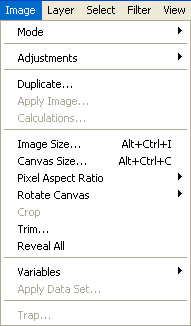
can't find the resize image lol
Re: guatemala(v10)
Posted: Fri Oct 01, 2010 5:16 am
by thenobodies80
google it

-->
http://lmgtfy.com/?q=photoshop+image+menuIn any case you should find it into the image menu, then selecting image size
Re: guatemala(v10)
Posted: Fri Oct 01, 2010 5:28 am
by jleonnn
ok lol thnx
Re: guatemala(v10)
Posted: Fri Oct 01, 2010 6:00 am
by kengyin
image - scale image, then type in dimensions. photoshop should be about the same as gimp which i use
Re: guatemala(v10)
Posted: Sun Oct 17, 2010 3:34 pm
by thenobodies80
It's passed more than a month since the last update. (10 Sept.)
If an update won't arrive in a reasonable amount of time, we will consider this project stalled.
Any news?
Re: guatemala(v10)
Posted: Sun Oct 24, 2010 12:58 pm
by thenobodies80
[Moved]
It would appear that development of this map has stalled. If the mapmaker wants to continue with the map, then one of the Foundry Moderators will be able to help put the thread back into the Foundry system, after an update has been made.
Re: guatemala(v10)
Posted: Fri Nov 05, 2010 8:15 pm
by jleonnn
ok I'm back. time to work on this.
Re: guatemala(v10)
Posted: Tue Dec 21, 2010 12:20 am
by jleonnn
Guatemala version 11
[bigimg]http://i831.photobucket.com/albums/zz232/Madmanmomomama/Guat.png[/bigimg]
-Basically recreated the map
-Personally I think it's less pixalated.
-The river kinda fits there.
Re: guatemala(v11) UPDATED
Posted: Wed Dec 22, 2010 9:47 am
by Industrial Helix
It's a lot less pixelated, but there's still some areas such as the legend, over the words Esquintla, the border between El Quiche and Alta Verapaz. And as a rule of thumb, you don't want any of your letters touching any borders, so gothrough each one and nudge t accordingly.
Moved.
Re: guatemala(v11) UPDATED
Posted: Wed Dec 22, 2010 11:09 am
by natty dread
This is an improvement from before, but still needs lots of work...
- You need more contrast between playable areas and non-playable ones. Currently the ocean looks so similar to the land area it's hard to see what is what. I suggest making the ocean much darker and lowering it's saturation as well.
- I would also suggest making the borders between territories a bit thinner (leaving the borders between different bonus areas as they are, so that bonus areas will have thicker borders than territories) and lowering the opacity on all of the borders. The borders are currently too dominating, if you make it as I suggest, it will help with that, and also make the bonus areas easier to see.
- Then, one more thing which I've said before - you need to fix the border between El Quiche & Peten - right now it looks ambiguous, you can't tell if El Quiche borders Peten or not. I would guess not, but you need to make it more clear.
Re: guatemala(v6)
Posted: Wed Dec 22, 2010 7:44 pm
by thenobodies80
MrBenn wrote:I'm surprised this is here with only 22 territories.....

And i'm surprised to see it here again with 22 territories
Sorry to be frank but even if I don't consider the number of territories and the graphics that certainly need more work, this map also presents many flaws and mistakes.
To be honest i'm not sure this is the correct workshop looking at the map...