Operating System: XP
Browser: Firefox
Scripts/third party programs used: BOB
If the bug happened in a game/s, do not forget to indicate the game number/s.
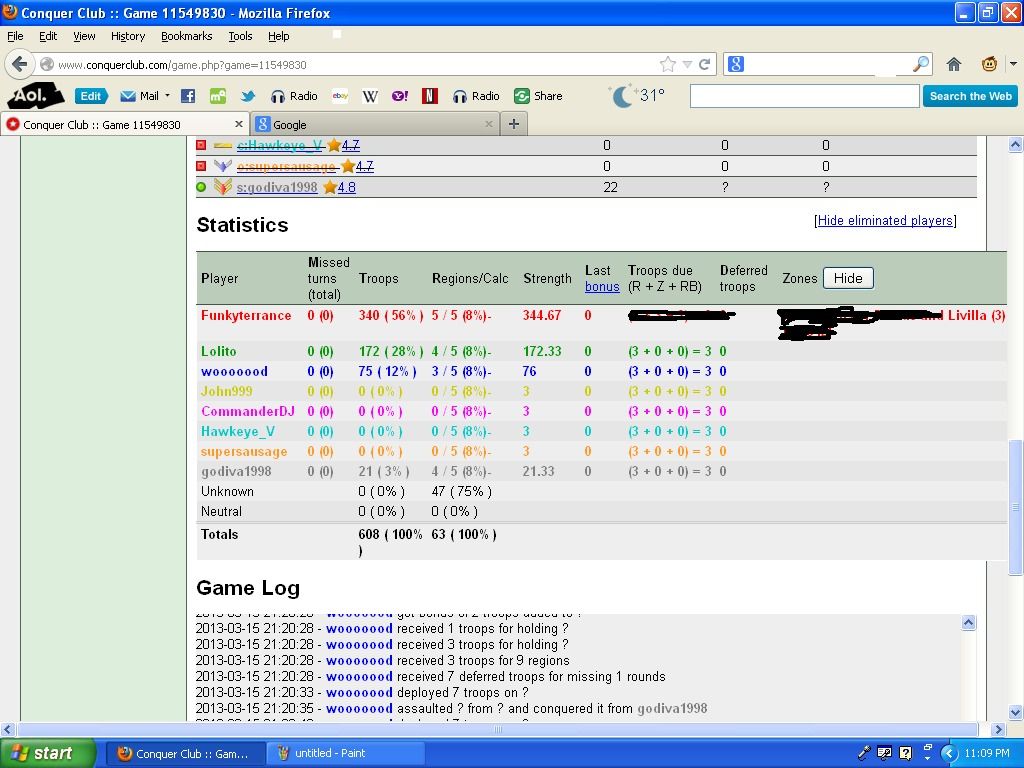
Concise description: After about the 125th round I realized that BOB function of telling how many bonuses were awarded last turn was not working and showed "0" as last bonus of everyone which is obviously wrong.
Game 11549830
BOB bonus function not working after roughly 125th round
Moderator: Tech Team
Forum rules
Please read the Community Guidelines before posting.
Please read the Community Guidelines before posting.
-
Funkyterrance

- Posts: 2494
- Joined: Wed Jan 19, 2011 10:52 pm
- Gender: Male
- Location: New Hampshire, USA

Re: BOB bonus function not working after roughly 125th round
Strange. I can see non-zero values in the Last Bonus column for everyone, and they match nicely with the values that I can count up in the Game Log.
-
Funkyterrance
- Posts: 2494
- Joined: Wed Jan 19, 2011 10:52 pm
- Gender: Male
- Location: New Hampshire, USA
Re: BOB bonus function not working after roughly 125th round
ender516 wrote:Strange. I can see non-zero values in the Last Bonus column for everyone, and they match nicely with the values that I can count up in the Game Log.
Wow...
Now you probably aren't going to believe this but I just checked and now it's fine but up until the last time I checked it's shown all 0's. I lost any chance of winning that game long ago so I wasn't really bothered but I figured it would be worth mentioning. Thanks BOB for making me look like a fibber!
I'll keep an eye on it though in case it happens again and maybe someone can catch it before it fixes itself again. Now I'm really weirded out by the coincidence. I'm pretty sure I'm not losing my mind...
Re: BOB bonus function not working after roughly 125th round
Of all the things I've ever lost, I miss my mind the most...
-
Funkyterrance
- Posts: 2494
- Joined: Wed Jan 19, 2011 10:52 pm
- Gender: Male
- Location: New Hampshire, USA
Re: BOB bonus function not working after roughly 125th round
Do you have any other scripts besides BOB?
Re: BOB bonus function not working after roughly 125th round
Funkyterrance wrote:lOl, ender...
Ok, it's doing it again!
Next time, please take a screenshot.
-
Funkyterrance
- Posts: 2494
- Joined: Wed Jan 19, 2011 10:52 pm
- Gender: Male
- Location: New Hampshire, USA
Re: BOB bonus function not working after roughly 125th round
ender516 wrote:Do you have any other scripts besides BOB?
Nope.
nicestash wrote:Funkyterrance wrote:lOl, ender...
Ok, it's doing it again!
Next time, please take a screenshot.
Good idea.

Re: BOB bonus function not working after roughly 125th round
Something is making the word "bonus" look like a link in the Statistics column header, and perhaps that same something is messing with the calculations. So the only script listed in the bottom portion of your Greasemonkey menu is BOB? I suspect another add-on. Go to the Firefox Add-ons Manager page (Ctrl-Shift-A). On the left are different categories: Extensions (also known as Add-ons, going by the Get Add-ons tab with the matching jigsaw puzzle piece icon), Plugins (with the building block icon) and User Scripts (the familiar monkey icon). You can double check the User Scripts, but they should match the Greasemonkey menu. The other two categories are your best bet. Look there for anything you don't recognize. Likely culprits would be recent additions. If you click on the More link of any of them, you will see information which should include a date when it was installed or updated.
-
AdamKeith

- Posts: 246
- Joined: Mon Jan 10, 2011 3:04 pm
- Gender: Male
- Location: South Carolina, United States
Re: BOB bonus function not working after roughly 125th round
ender516 wrote:Something is making the word "bonus" look like a link in the Statistics column header, and perhaps that same something is messing with the calculations. So the only script listed in the bottom portion of your Greasemonkey menu is BOB? I suspect another add-on. Go to the Firefox Add-ons Manager page (Ctrl-Shift-A). On the left are different categories: Extensions (also known as Add-ons, going by the Get Add-ons tab with the matching jigsaw puzzle piece icon), Plugins (with the building block icon) and User Scripts (the familiar monkey icon). You can double check the User Scripts, but they should match the Greasemonkey menu. The other two categories are your best bet. Look there for anything you don't recognize. Likely culprits would be recent additions. If you click on the More link of any of them, you will see information which should include a date when it was installed or updated.
I think the bonus link is an ad. I get ads such like that on my computer. When you roll over the link a small text box pops up (an advert). I don't think that is the problem.
[bigimg]http://imageshack.us/a/img812/3214/n0m.png[/bigimg]